0.愚蠢的代码
// 将pointsInsideRect内部点平均(数量上)
List<(double x, double y)> find_enter_points;
List<(double x, double y)> find_exit_points;
SplitList(pointsInsideRect, out find_enter_points, out find_exit_points);
var in_mostClosedPoint = FindClosestPoints(find_enter_points, boundary_coordinates); // 返回值是对应容器中的数据
var out_mostClosedPoint = FindClosestPoints(find_exit_points, boundary_coordinates);
int start_index = pointsInsideRect.IndexOf(in_mostClosedPoint.point1) + 1;
int end_index = pointsInsideRect.IndexOf(out_mostClosedPoint.point1) - 1;
int target_count = end_index - start_index + 1;
List<(double x, double y)> pointsInsideBoundary = pointsInsideRect.GetRange(start_index, target_count);

// 向内找300m.(东北天坐标系单位都为m)
int range_Value = int.Parse(RangeValueTextBox.Text);
var enter_center_point = in_mostClosedPoint.point2;
var exit_center_point = out_mostClosedPoint.point2;
double start_end_dis = CalculateDistance(enter_center_point, exit_center_point);
var true_start_point = (0.0, 0.0);
var true_end_point = (0.0, 0.0);

if (start_end_dis < range_Value * 2)
{
    MessageBox.Show($"边界缩进范围有重合,缩小范围重试(不要超过:{start_end_dis * 0.5}m", "警告", MessageBoxButtons.OK, MessageBoxIcon.Warning);
}
else
{
    true_start_point = FindStationPoint(pointsInsideBoundary, enter_center_point, range_Value);
    List<(double x, double y)> co_pointsInsideBoundary = new List<(double x, double y)>(pointsInsideBoundary);
    pointsInsideBoundary.Reverse();
    true_end_point = FindStationPoint(pointsInsideBoundary, exit_center_point, range_Value);
    // 检查过度取点情况
    int true_startindex = co_pointsInsideBoundary.IndexOf(true_start_point);
    int true_endindex = co_pointsInsideBoundary.IndexOf(true_end_point);
    if (true_startindex >= true_endindex)
    {
        MessageBox.Show("起始桩号大于结束桩号,请再缩小范围重试", "警告", MessageBoxButtons.OK, MessageBoxIcon.Warning);
    }
}
1.DateTimePicker控件获取时间
拖动控件,设置属性format为custom格式。例如我想获得20240101这种类型的string类型的数据:
string DateTime = DateTimePicker.Value.ToString("yyyyMMdd");
2.ComboBox下拉列表控件
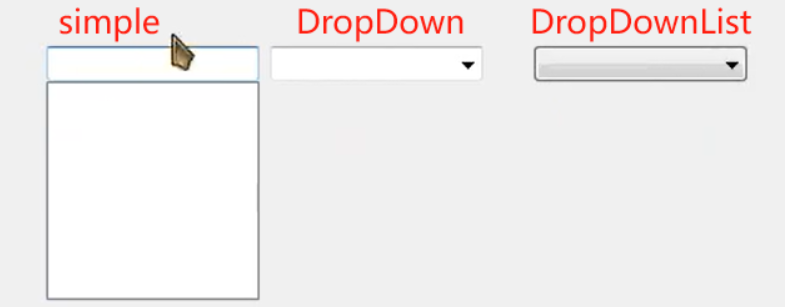
默认为DropDown,下拉可修改。
DropDownList为下拉不可修改。
3.WinForm关闭新(二级)界面使主程序关闭
参考视频:https://www.bilibili.com/video/BV1JY4y1G7jo/?p=14&vd_source=1c57ab1b2e551da5b65c0dfb0f05a493
主程序界面,点击弹出二级界面(同时隐藏主界面),不做任何设置,这时关闭二级界面后主程序进程不会终止。
在属性中找到FormClosing属性,双击进入方法实现:
Application.Exit();
4. this.Close()和this.Hide()有什么区别
this.Close():
- 功能:关闭当前窗口。
- 行为:在调用 this.Close() 时,窗口会被销毁,所有与窗口相关的资源都将被释放。窗口的FormClosed 事件将会被触发。
- 生命周期:调用 Close方法后,窗口对象不再存在,你不能再重新显示这个窗口,除非重新创建一个新的实例。
this.Hide():
- 功能:隐藏当前窗口。
- 行为:在调用 this.Hide() 时,窗口会被隐藏但不会被销毁。窗口的 Visible 属性将被设置为false,窗口仍然存在于内存中。
- 生命周期:调用 Hide 方法后,窗口对象仍然存在,可以通过 this.Show()方法重新显示这个窗口。
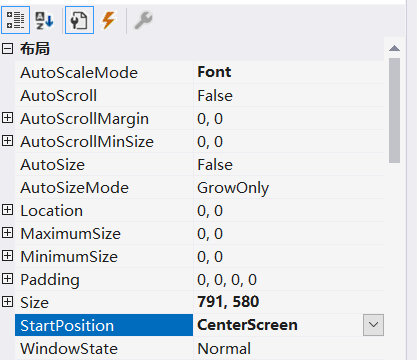
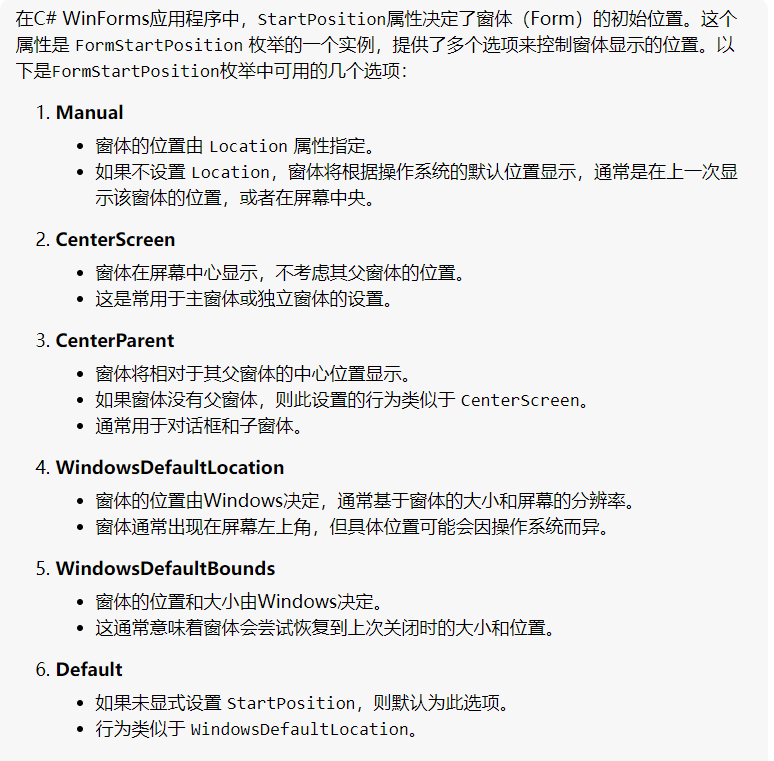
4.winForm窗体打开后在屏幕中间显示
5.C#堆区new开辟新对象问题
今天的代码开发中遇到一个问题:
excelPackage.SaveAs(FileInfo file);
该函数是将写好的Excel保存到本地文件,根据文档传入参数为FileInfo类型的对象,但实际上直接传入string类型的字符串也可以保存。
于是出现下述情况:
FileInfo fi = new FileInfo(saveFilePath);
excelPackage.SaveAs(fi);
和直接传string类型
excelPackage.SaveAs(saveFilePath);
功能上似乎不存在区别,没有堆区常见的问题,不需要手动销毁堆区开辟的对象(不似乎是C#的优势之处)
代码灵活性上来说,第一种功能更丰富,可以在保存文件前调试查看文件是否存在,文件相关信息等。第二种则是更直接简单,代码更简洁。
6.重新打开软件后,textbox控件依旧显示上次键入的内容
原以为程序关闭后,所有进程和内存都会被杀死和清楚,此功能呢不好实现,是否要设计到数据库之类的(不会…)
但是C#有本地应用程序设置 (Application Settings)的功能,因为它使用的是.NET自带的设置管理功能,非常简单且方便。
在Visual Studio种找到项目名,右击属性–设置,新添加一个设置:例如,名字为LastText,类型为string,作用域为用户。
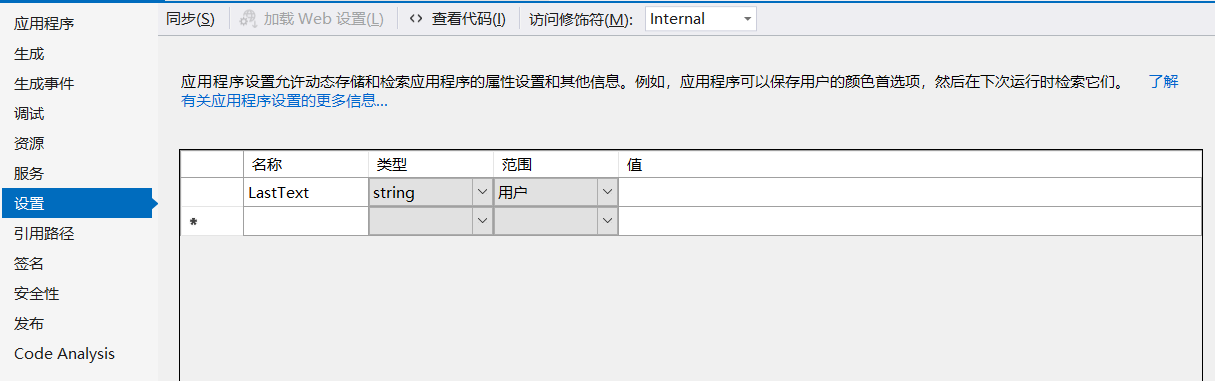
在需要的窗体下找到属性:FormClosing,关闭前将信息写入属性中保存在本地,然后在打开后初始化展示
private void OutcomeDo_FormClosing(object sender, FormClosingEventArgs e)
{
    Properties.Settings.Default.LastText = ProjectNameTextBox.Text;
    Properties.Settings.Default.Save();
    Application.Exit(); // 二级菜单关闭后主进程结束
}
private void OutcomeDo_Load(object sender, EventArgs e)
{
	ProjectNameTextBox.Text = Properties.Settings.Default.LastText;
}
7.C# ref和out关键字
1.ref关键字:
ref关键字用于按引用传递参数,可以修改传入的参数,相当于cpp中的&符号。
2.out关键字
out关键字也是按引用传入参数,与ref类似,但是也有区别:
(1)ref传参前需要将参数先初始化(声明并赋值),而out不需要。
using System;

class Program
{
    static void Main()
    {
        int number = 5; // 声明并赋值
        Console.WriteLine($"Before method call: {number}");

        Increment(ref number);

        Console.WriteLine($"After method call: {number}");
    }

    static void Increment(ref int value)
    {
        value++;
    }
}
(2)但是被标记为out的参数必须在内部被赋值(只在外部声明即可)。
using System;

class Program
{
    static void Main()
    {
        int result;
        string message; // 不需要赋值

        bool success = TryParseInt("123", out result, out message);

        if (success)
        {
            Console.WriteLine($"Parsed successfully: {result}");
        }
        else
        {
            Console.WriteLine($"Failed to parse: {message}");
        }
    }

    static bool TryParseInt(string input, out int number, out string errorMessage)
    {
        if (int.TryParse(input, out number))
        {
            errorMessage = null; // 内部需要被赋值
            return true;
        }
        else
        {
            errorMessage = "Input is not a valid integer.";
            return false;
        }
    }
}
8.代码中过多的自动推导var关键字回影响代码效率吗?
不会。使用var不会影响代码的运行效率,因为类型推断是在编译时完成的,而不是运行时。
而且,var关键字自动推导,可以方便管理,不需要每个类型都维护;同时减少出错概率;更加简洁。