一:什么是事件监听
指程序检测有无某一事件发生,如果发生,就调用一个函数做出反应;也称为绑定事件或注册事件
比如鼠标经过显示下拉菜单、点击侧边栏播放轮播图
二:怎么用事件监听
1 语法规范:
元素对象.addEventListener('事件类型',要执行函数(匿名函数))2 注意点:
- 事件类型要加引号
- 函数是事件触发之后再去执行,每次触发都会执行一次
三:案例
1 点击关闭按钮,实现广告关闭效果
<style>
    .box1 {
      width: 300px;
      height: 300px;
      background-color: pink;
      position: relative;
    }

    .box2 {
      position: absolute;
      width: 40px;
      height: 40px;
      right: 0;
      top: 0;
      line-height: 40px;
      text-align: center;

    }
</style>
<body>
  <div class="box1">
    广告
    <div class="box2">X</div>
  </div>
  <script>
    const box1 = document.querySelector('.box1')
    const box2 = document.querySelector('.box2')
    box2.addEventListener('click', function () {
      box1.style.display = 'none'
    })
  </script>
</body>
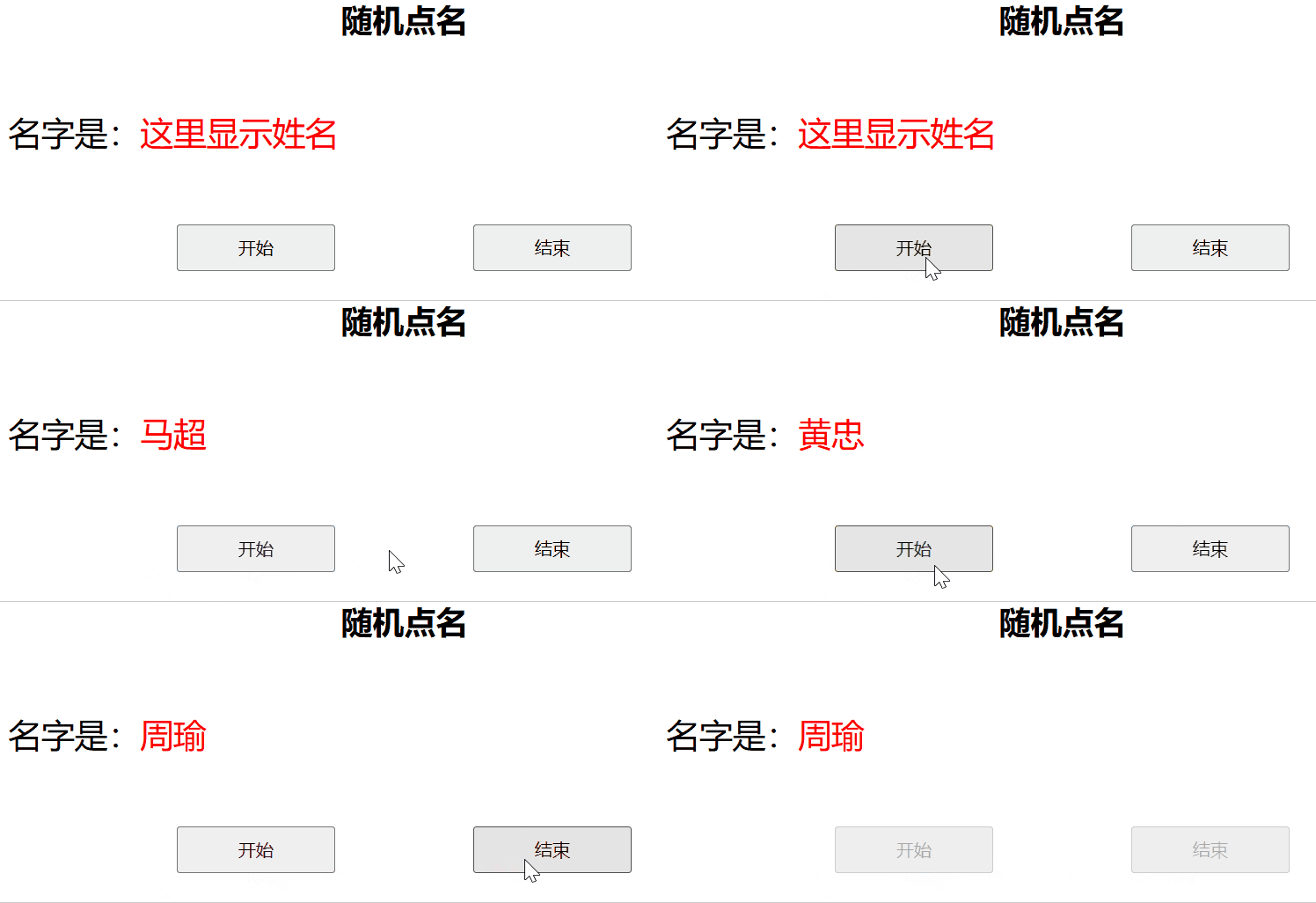
2 随机点名案例
1 拆解需求:
- 点击开始按钮
- 选人,涉及随机数生成问题(Math.floor(Math.random() * arr.length))
- 删除选中的人(数组splice()方法)
- 结束按钮
- 停止选人(牵涉全局变量与局部变量问题)
- 选到最后一个人
- 如果数组中还剩最后一个人,则禁用两个按钮
2 代码:
<!DOCTYPE html>
<html lang="en">

<head>
  <meta charset="UTF-8">
  <meta name="viewport" content="width=device-width, initial-scale=1.0">
  <title>Document</title>
  <style>
    * {
      margin: 0;
      padding: 0;
    }

    h2 {
      text-align: center;
    }

    .box {
      width: 600px;
      margin: 50px auto;
      display: flex;
      font-size: 25px;
      line-height: 40px;
    }

    .qs {

      width: 450px;
      height: 40px;
      color: red;

    }

    .btns {
      text-align: center;
    }

    .btns button {
      width: 120px;
      height: 35px;
      margin: 0 50px;
    }
  </style>
</head>
<body>
  <h2>随机点名</h2>
  <div class="box">
    <span>名字是:</span>
    <div class="qs">这里显示姓名</div>
  </div>
  <div class="btns">
    <button class="start">开始</button>
    <button class="end">结束</button>
  </div>

  <script>
    // 数据数组
    const arr = ['马超', '黄忠', '周瑜']
    //设定变量为全局变量,以便于后期的调用
    let timer = 0
    //随机号为全局变量
    let num = 0
    // 1 获取元素
    const qs = document.querySelector('.qs')
    const start = document.querySelector('.start')
    const end = document.querySelector('.end')
    // 2 点击按钮,开启一个定时器;产生一个随机数;将数组中的内容显示到页面上
    start.addEventListener('click', function () {
      timer = setInterval(function () {
        num = Math.floor(Math.random() * arr.length)
        qs.innerHTML = arr[num]
      }, 35)
    // 4 抽取到最后一个数组元素,两个按钮同时禁用
      if (arr.length == 1) {
        start.disabled = true
        end.disabled = true
      }
    })
    // 3 点击结束按钮,关闭定时器
    end.addEventListener('click', function () {
      clearInterval(timer)
      arr.splice(num, 1)
      console.log(arr);
      if (arr.length == 1) {
        start.disabled = true
        end.disabled = true
      }
    })
  </script>
</body>
</html>