H3C IPV6路由实验
实验拓扑
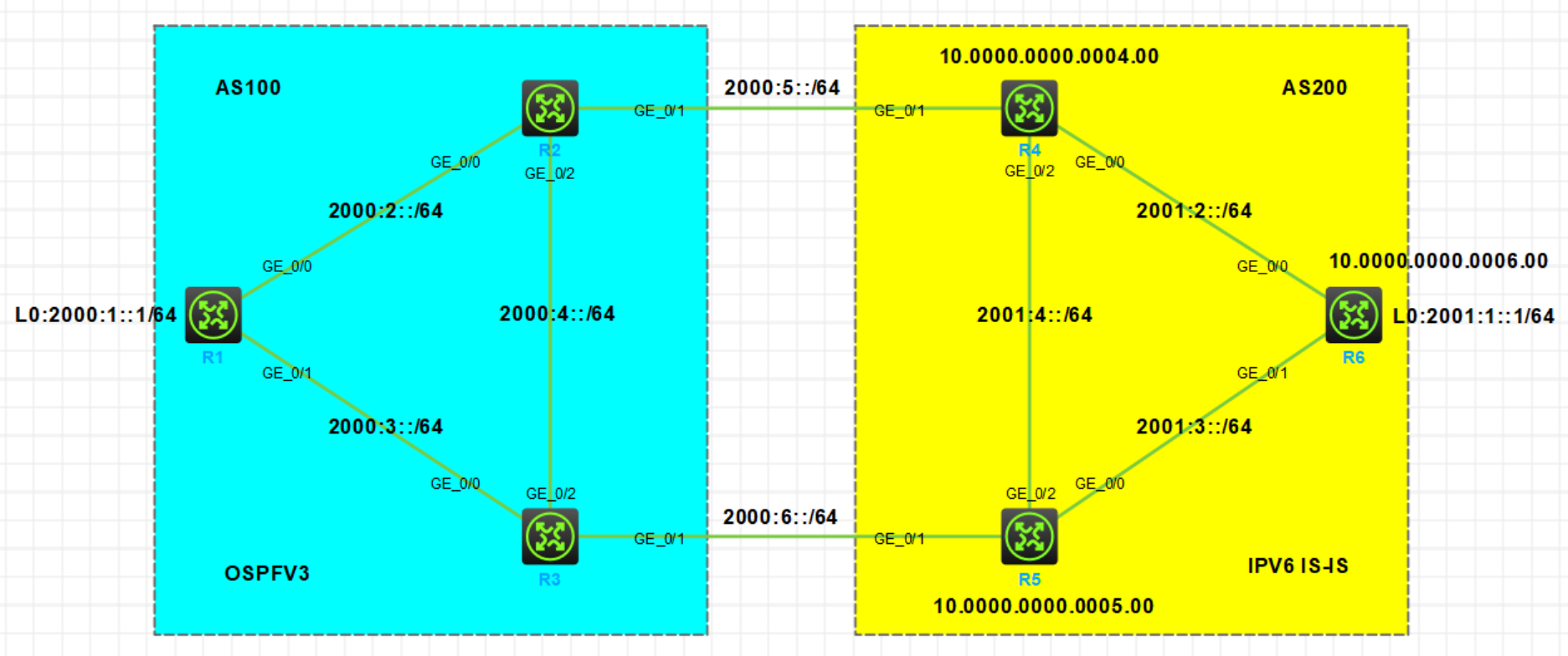
实验需求
- 按照图示配置 IPv6 地址,R1 和 R6 使用 Loopback0 口模拟业务地址
- 按照图示配置单区域 OSPFv3 和单区域 IPv6 IS-IS 使 AS100 和 AS 200 内部分别互通
- 配置 BGP4+,R1 和 R2/R3 建立 IBGP 邻居;R6 和 R4/R5 建立 IBGP 邻居;R2 和 R4,R3 和 R5 分别建立 EBGP 邻居
- 在 R1 和 R6 上分别以 Network 方式把各自业务路由宣告进 BGP,使 R1 和 R6 的业务地址能够通过 BGP 路由实现互通
实验步骤
设备配置IPV6地址
R1配置IPV6地址
[R1]display ipv6 interface brief
*down: administratively down
(s): spoofing
Interface                                 Physical Protocol IPv6 Address
GigabitEthernet0/0                        up       up       2000:2::1
GigabitEthernet0/1                        up       up       2000:3::1
LoopBack0                                 up       up(s)    2000:1::1
R2配置IPV6地址
[R2]display ipv6 interface brief
*down: administratively down
(s): spoofing
Interface                                 Physical Protocol IPv6 Address
GigabitEthernet0/0                        up       up       2000:2::2
GigabitEthernet0/1                        up       up       2000:5::2
GigabitEthernet0/2                        up       up       2000:4::2
R3配置IPV6地址
[R3]display ipv6 interface brief
*down: administratively down
(s): spoofing
Interface                                 Physical Protocol IPv6 Address
GigabitEthernet0/0                        up       up       2000:3::3
GigabitEthernet0/1                        up       up       2000:6::3
GigabitEthernet0/2                        up       up       2000:4::3
R4配置IPV6地址
[R4]display ipv6 interface brief
*down: administratively down
(s): spoofing
Interface                                 Physical Protocol IPv6 Address
GigabitEthernet0/0                        up       up       2001:2::4
GigabitEthernet0/1                        up       up       2000:5::4
GigabitEthernet0/2                        up       up       2001:4::4
R5配置IPV6地址
[R5]display ipv6 interface brief
*down: administratively down
(s): spoofing
Interface