使用和配置:超秀的 MySQL 客户端工具 MyCli
- 2024-04-27 11:22
- 26人 已看
1.安装一个更人性化的一个mysql客户端、终端:
sudo apt install mycli
登录方式
mycli -uroot + password
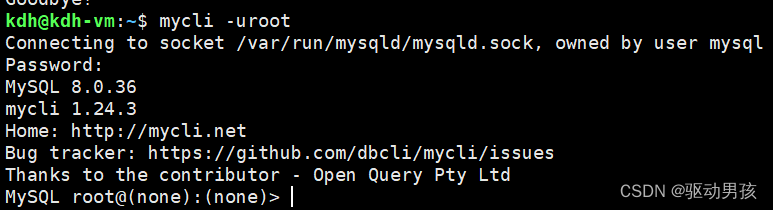
2. 功能:界面更好看,且支持自动补全,按tab可以补全

3.mycli使用帮助说明文档
mycli --help

用法: mycli [OPTIONS] [DATABASE]

 例如:
    - mycli my_database
    - mycli -u my_user_name -h my_host.com my_database
    - mycli mysql://my_user@my_host.com:3306/my_database


常用选项:
  -h, --host TEXT               数据库的主机地址.
  -P, --port INTEGER            用于连接的端口号. Honors$MYSQL_TCP_PORT.
  -u, --user TEXT               要连接数据库的用户名.
  -S, --socket TEXT             用于连接的套接字文件.
  -p, --password TEXT           要连接数据库的密码.
  --help                        查看帮助信息

非常用选项:
  --pass TEXT                   要连接数据库的密码.
  --ssh-user TEXT               连接SSH服务器的用户名.
  --ssh-host TEXT               连接SSH服务器的主机名.
  --ssh-port INTEGER            连接SSH服务器的端口.
  --ssh-password TEXT           连接SSH服务器的密码.
  --ssh-key-filename TEXT       Private key filename (identify file) for the
                                ssh connection.
  --ssl-ca PATH                 CA file in PEM format.
  --ssl-capath TEXT             CA directory.
  --ssl-cert PATH               X509 cert in PEM format.
  --ssl-key PATH                X509 key in PEM format.
  --ssl-cipher TEXT             SSL cipher to use.
  --ssl-verify-server-cert      Verify server's "Common Name" in its cert
                                against hostname used when connecting. This
                                option is disabled by default.
  -V, --version                 Output mycli's version.
  -v, --verbose                 Verbose output.
  -D, --database TEXT           Database to use.
  -d, --dsn TEXT                Use DSN configured into the [alias_dsn]
                                section of myclirc file.
  --list-dsn                    list of DSN configured into the [alias_dsn]
                                section of myclirc file.
  -R, --prompt TEXT             Prompt format (Default: "\t \u@\h:\d> ").
  -l, --logfile FILENAME        Log every query and its results to a file.
  --defaults-group-suffix TEXT  Read MySQL config groups with the specified
                                suffix.
  --defaults-file PATH          Only read MySQL options from the given file.
  --myclirc PATH                Location of myclirc file.
  --auto-vertical-output        Automatically switch to vertical output mode
                                if the result is wider than the terminal
                                width.
  -t, --table                   Display batch output in table format.
  --csv                         Display batch output in CSV format.
  --warn / --no-warn            Warn before running a destructive query.
  --local-infile BOOLEAN        Enable/disable LOAD DATA LOCAL INFILE.
  --login-path TEXT             Read this path from the login file.
  -e, --execute TEXT            Execute command and quit.
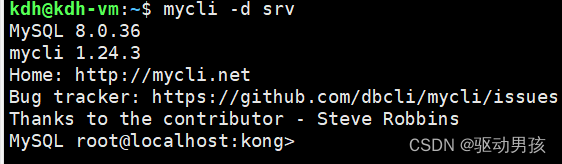
4.设置mycli的快捷登录数据库的方式
vim ~/.myclirc

效果:可以通过以下命令直接进入kong这个数据库中,且不用输入密码
mycli -d srv
-d 是指定快捷方式的名称的
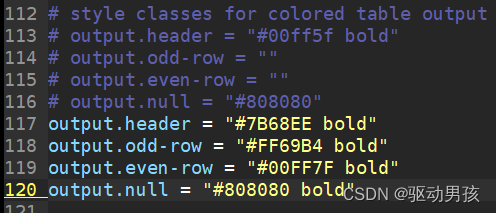
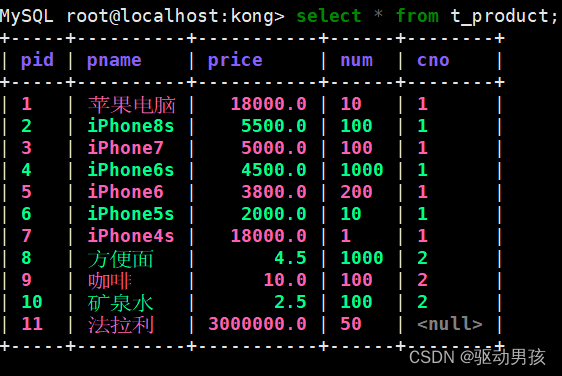
5.配置mycli输出结果的颜色 和 字体
vim ~/.myclirc
效果展示
6.配置改变输入的习惯,从vi模式进入到emacs模式,emacs是可以想vim一样在命令行中进行移动光标进行内容的修改
ctrl + a可以移动到某行的行首
ctrl + e可以移动到某行的行尾
ctrl + l 可以清屏且只显示当行的内容
ctrl + p 可以在当前行向上移动
ctrl + n 可以在当前行想下移动
vim ~/.myclirc

效果

