# Boundary
通用的边界,同时是一个Suspense 和一个 ErrorBoundary
正常情况不直接用,使用一下几个封装好的:
-Boundary.FullSizeLoading: 占满父容器全部高度,居中显示等待动画;
-Boundary.Loading: 占满一行,显示一个普通尺寸的等待动画;
-Boundary.Blank: 什么都不显示,加速速度足够快的话可以使用;
先看一下代码目录结构:
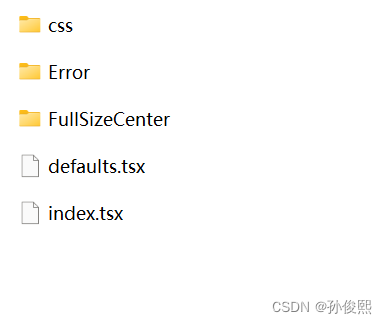
(1)index.tsx
import {ComponentProps} from 'react';
import {Boundary as SuspenseBoundary,SuspenseBoundaryProps} from 'react-suspense-boundary';
import styled from '@emotion/styled';
import {times} from 'ramda';
import {Spin,Skeletion} from 'antd';
import {flexCenter} from './css/flex';
import fullSizeCenter from './FullSizeCenter/index';
import {defaultRenderError,defaultRenderFullSizeError} from './defaults';

interface Props extends SuspenseBoundaryProps{
    /**
     * 显示错误时是否占满整个容器
     */
    fullSize?:boolean;
}

function Boundary({fullSize =false,...props}:Props){
    return (
        <SuspenseBoundary
           {...props}
           renderError={props.renderError ?? (fullSize ? defaultRenderFullSizeError : defaultRenderError)}
        />
    )
}

Boundary.FullSizeLoading = function FullSizeLoadingBoundary(props:SuspenseBoundaryProps){
    return (
        <Boundary
            fullSize
            pendingFallback={
                <fullSizeCenter>
                    <Spin size="large" />
                </fullSizeCenter>
            }
        />
    )
}

export interface SkeletionProps extends SuspenseBoundaryProps,Omit<Components<typeof Skeletion>,'children'>{
    repeat?:number;
}

Boundary.Skeletion = function SkeletionBoundary({repeat=1,...props}:SkeletionProps){
    return (
        <Boundary
            pendingFallback={
               <div>
                  {times(i => <Skeletion loading active key={i} {...props} />,repeat)}
               </div>
            }
            {...props}
        />
    )
}

Boundary.FullSizeSkeletion = function FullSizeSkeletionBoundary({repeat=1,...props}:SkeletionProps){
    return (
        <Boundary
            fullSize
            pendingFallback={
                <fullSizeCenter>
                  {times(i => <Skeletion loading active key={i} {...props} />,repeat)}
                </fullSizeCenter>
            }
            {...props}
        />
    )
}

const LoadingContainer =styled.div`
    ${flexCenter};
    margin : 20px 0;
`

Boundary.Loading = function LoadingBoundary(props:SuspenseBoundaryProps){
    return(
        <Boundary
          pendingFallback={
              <LoadingContainer>
                  <Spin />
              </LoadingContainer>
          }
          {...props}
        />
    )
}

Boundary.InlineLoading = function InlineLoadingBoundary(props:SuspenseBoundaryProps){
    return <Boundary pendingFallback={<Spin size="small" />} {...props} />
}

Boundary.Blank = function BlankBoundary(props:SuspenseBoundaryProps){
    return <Boundary pendingFallback={<fullSizeCenter />} {...props} />
}

export default Boundary;
(2)defaults.tsx
inport Error from './Error';
import FullSizeCenter from './FullSizeCenter';

const renderErrorWithFullSize=(fullSize:boolean)=>(error:any)=>{
    const message = error?.message;
    const errorType=error?.responseStatus || '400';
    if(fullSize){
        return (
            <FullSizeCenter>
                <Error type={errorType} message={message} displayInDetail></Error>
            </FullSizeCenter>
        )
    }
    return   <Error type={errorType} message={message} displayInDetail></Error>
}

export const defaultRenderError = renderErrorWithFullSize(false);
export const defaultRenderFullSizeError = renderErrorWithFullSize(true);
(3)Error/index.tsx
import {createElement} from 'react';
import {useToggle} from '@huse/boolean';
import {Empty,Gap,Button} from 'antd';
import FullSizeCenter from '../FullSizeCenter';
import ServerError from './ServerError.svg?react';
import ClientError from './ClientError.svg?react';
import Forbidden from './Forbidden.svg?react';
import NotFound from './NotFound.svg?react';

const STATUS_CODE_TO_COMPONENT={
    400:ClientError,
    403:Forbidden,
    404:NotFound,
    500:ServerError
};

const GENERAL_ERROR_MESSAGE='请求时出现错误';

const  STATUS_CODE_TO_MESSAGE={
    400:GENERAL_ERROR_MESSAGE,
    403:'无权限',
    404:'找不到指定页面',
    500:'未知的服务端错误',
}

interface Props{
    type?:'500' | '400' | '403' | '404';
    message?:string;
    displayInDetail?:boolean;
    className?:string;
};

export default function Error({type='400',message,displayInDetail,className}:Props){
    const [expand,toggle]=useToggle(false);
    const errorMessage = displayInDetail ? GENERAL_ERROR_MESSAGE : message;
    return (
        <FullSizeCenter style={{flexDirection:'cloumns'}}>
           <Empty
            image={createElement(STATUS_CODE_TO_COMPONENT[type])}
            description={errorMessage ?? STATUS_CODE_TO_MESSAGE[type]}
            className={className}
           />
           {
               displayInDetail && (
                   <>
                      <Gap.Vertical factor={4} base={4} />
                      <Button type="link" onClick={toggle}>{expand ? '收起' : '查看详情'}</Button>
                      {
                          expand && (
                              <p style={{wordBreak:'break-all'}}>
                                {message}
                              </p>
                          )
                      }

                   <>
               )
           }
        </FullSizeCenter>
    )
}
(4)FullSizeCenter/index.tsx
import styled from '@emotion/styled';
import fullSizeFlexCenter from '../css/flex';

const fullSizeCenter=styled.div`
${fullSizeFlexCenter}
`
export default fullSizeCenter;
(5)css/flex.ts
import {css} from '@emotion/react';

export const flexCenter =css`
display:flex;
align-items:center;
justify-content:center;
`

export const fullSizeFlexCenter =css`
${flexCenter}
width:100%;
height:100%;
min-height:inherit;
`
使用时,直接用封装好的边界组件来作为顶层组件来包裹其他组件,例如:
<Boundary.Loading >
   ...其他代码
</Boundary.Loading >
代码缺少几个状态码对应的svg,感兴趣的小伙伴自己可以找一下!!