前提-maven mirrors配置
 <mirrors>
 <!--阿里公有仓库-->
	<mirror>
		<id>nexus-aliyun</id>
		<mirrorOf>central</mirrorOf>
		<name>Nexus aliyun</name>
		<url>http://maven.aliyun.com/nexus/content/groups/public</url>
	</mirror>
</mirrors>
问题1
描述:ngrinder-groovy3.4.jar包下载失败
ngrinder3.4创建的maven项目-ngrinder-groovy3.4依赖一直下载失败-解决办法
通过运行脚本,报错信息如下:
Cannot resolve org.ngrinder:ngrinder-groovy:pom:3.4 failed to transfer from https://github.com/naver/ngrinder/raw/ngrinder.maven.repo/releases during a previous attempt. This failure was cached in the local repository and resolution is not reattempted until the update interval of ngrinder.maven.repo has elapsed or updates are forced. Original error: Could not transfer artifact org.ngrinder:ngrinder-runtime:pom:3.4.4 from/to ngrinder.maven.repo (https://github.com/naver/ngrinder/raw/ngrinder.maven.repo/releases): transfer failed for https://github.com/naver/ngrinder/raw/ngrinder.maven.repo/releases/org/ngrinder/ngrinder-groovy/3.4/ngrinder-groovy-3.4.pom
解决:下载ngrinder-groovy-3.4.jar
1、通过运行脚本,报错信息可以看到,ngrinder-groovy-3.4.jar对应的ngrinder的github远程仓库地址为 https://github.com/naver/ngrinder/raw/ngrinder.maven.repo/releases,
下载ngrinder-groovy-3.4.jar,如下图:
https://github.com/naver/ngrinder/tree/ngrinder.maven.repo/releases/org/ngrinder/ngrinder-groovy/3.4
点击下载 ngrinder-groovy-3.4.jar。
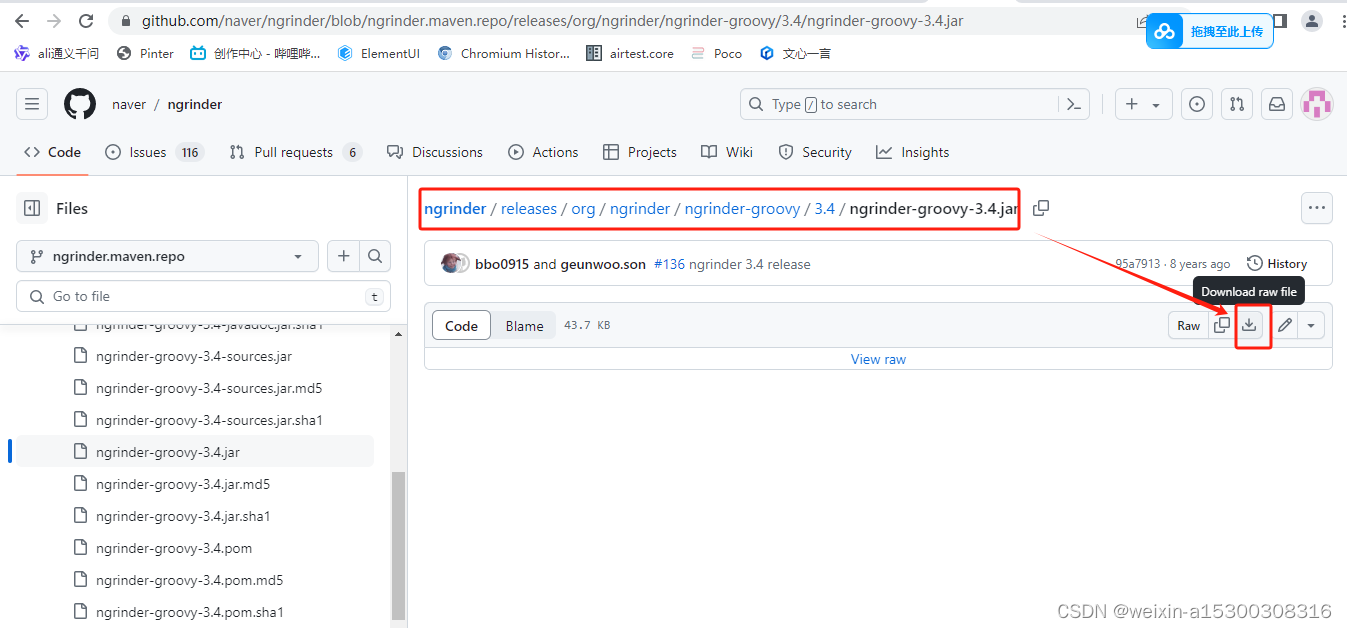
2、存储到项目对应的maven目录下,和线上仓库相同路径。
并且放入maven仓库对应的目录下(maven配置参考地址),如下:
C:\D\soft\Maven_Repo\org\ngrinder\ngrinder-groovy\3.4
刷新maven依赖,后依赖问题解决。
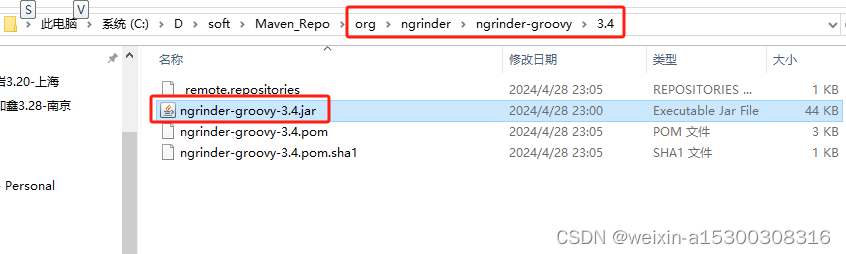
刷新maven依赖,后依赖问题解决。
###############
问题2
描述:本地调试脚本时,提示错误,如下
java.lang.RuntimeException: Please add -javaagent:C:\D\soft\Maven_Repo\net\sf\grinder\grinder-dcr-agent\3.9.1\grinder-dcr-agent-3.9.1.jar in 'Run As JUnit' vm argument.
解决:配置grinder-dcr-agent-3.9.1.jar
这个错误信息指示你需要在运行JUnit测试时,向Java虚拟机(JVM)添加一个Java代理(javaagent)参数。这个参数是为了加载grinder-dcr-agent-3.9.1.jar,它是Grinder分布式测试框架的一部分,用于监控和管理性能测试。
要解决这个问题,在你的IDEA中按照以下步骤操作:
IntelliJ IDEA:
-
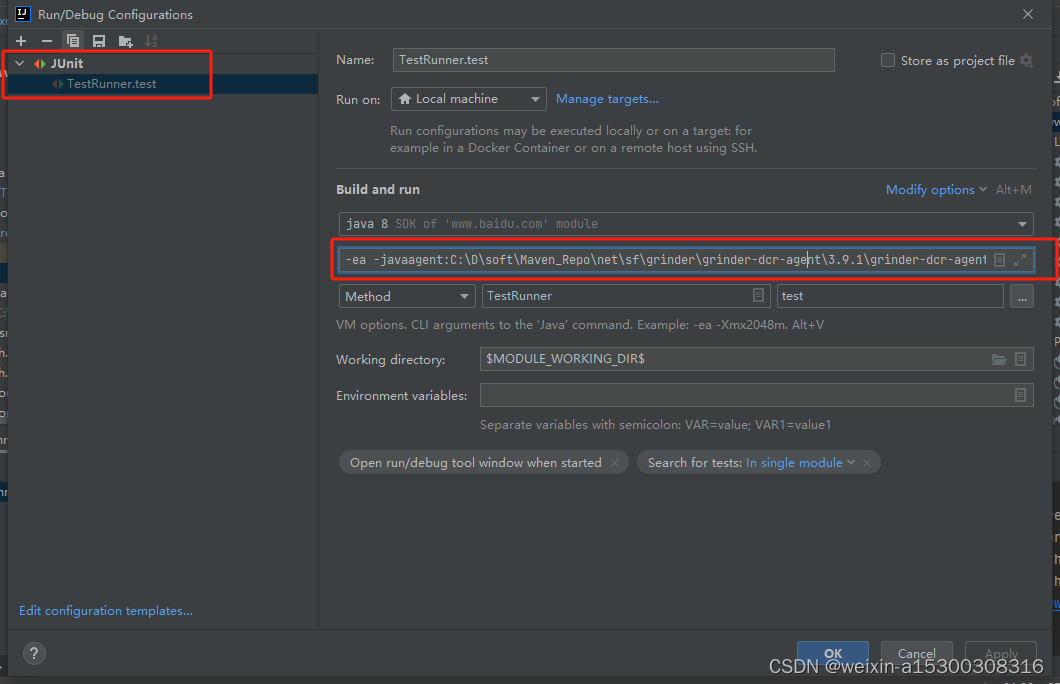
打开运行/调试配置:在顶部菜单中选择“Run” -> “Edit Configurations...”。
-
选择或创建JUnit配置:在弹出的窗口中,找到你的测试类对应的JUnit配置,或者点击左上角的“+”号添加一个新的JUnit配置。
-
配置VM选项:在配置界面中,找到“VM options”字段。
-
添加代理参数:在此字段中,输入与Eclipse中相同的Java代理参数:-ea -javaagent:C:\D\soft\Maven_Repo\net\sf\grinder\grinder-dcr-agent\3.9.1\grinder-dcr-agent-3.9.1.jar,如图
-
检查下载的maven仓库中,
C:\D\soft\Maven_Repo\net\sf\grinder\grinder-dcr-agent\3.9.1\grinder-dcr-agent-3.9.1.jar是正确的,并且该JAR文件存在于指定位置。如果路径有误,你需要根据实际情况调整,确保grinder-dcr-agent-3.9.1.jar文件正常。如果下载的文件不全,则删除不完整的文件后,重新下载。 -
应用并运行:点击“OK”应用设置,然后你可以直接运行这个配置来执行测试。运行正常。如图
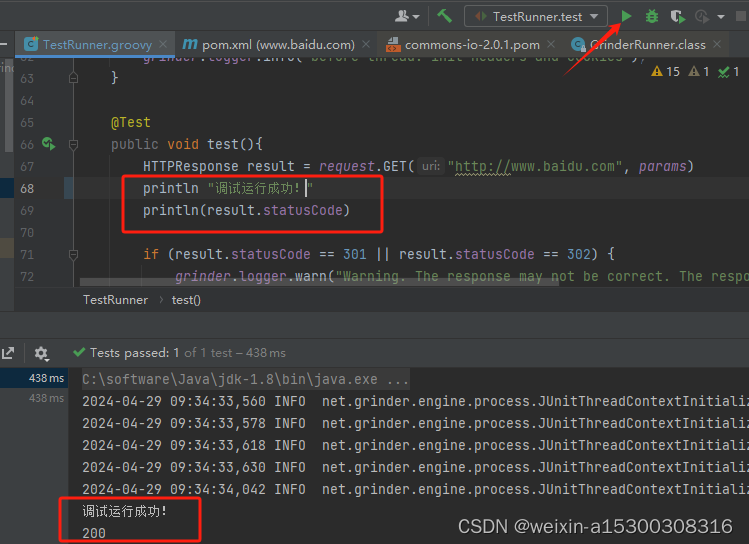 注意:本地调试ngrinder时,不需要启动agent客户端。
问题3:ngrinder-runtime下载失败
添加pom.xml 中添加 maven如下
        <dependency>
			<groupId>org.ngrinder</groupId>
			<artifactId>ngrinder-runtime</artifactId>
			<version>3.4.4</version>
		</dependency>
刷新maven时,idea项目提示如下错误
Cannot resolve org.ngrinder:ngrinder-runtime:pom:3.4.4 failed to transfer from https://github.com/naver/ngrinder/raw/ngrinder.maven.repo/releases during a previous attempt. This failure was cached in the local repository and resolution is not reattempted until the update interval of ngrinder.maven.repo has elapsed or updates are forced. Original error: Could not transfer artifact org.ngrinder:ngrinder-runtime:pom:3.4.4 from/to ngrinder.maven.repo (https://github.com/naver/ngrinder/raw/ngrinder.maven.repo/releases): transfer failed for https://github.com/naver/ngrinder/raw/ngrinder.maven.repo/releases/org/ngrinder/ngrinder-runtime/3.4.4/ngrinder-runtime-3.4.4.pom
错误提示表明
1、没有下载成功的依赖包名为:ngrinder-runtime-3.4.4.jar
2、通过远端仓库路径,对应本地仓库中没有下载成功的文件:maven本地仓库地址 + org/ngrinder/ngrinder-runtime/3.4.4/目录下,如图

3、也可以在本地maven仓库地址下搜索关键字:lastUpdated,也能查到上图未下载完成的文件。
4、可以通过maven下载失败的提示,从github,ngrinder远程仓库下载,远程仓库地址为:
https://github.com/naver/ngrinder/raw/ngrinder.maven.repo/releases
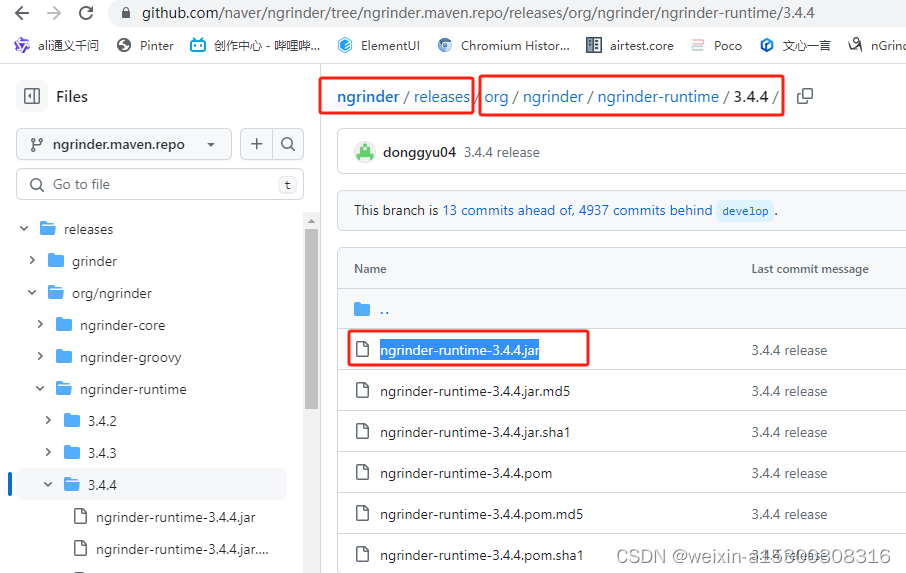
从远端参考下载jar包
下载ngrinder-runtime-3.4.4.jar文件后,放入对应的 本地maven本地仓库路径,刷新maven依赖。问题解决。
问题4:本地调试脚本成功的脚本,上传到ngrinder平台后,执行失败,提示:
Copy dependencies by running 'mvn dependency:copy-dependencies –
DoutputDirectory=./lib -DexcludeScope=provided'
Dependencies copy in mavenP1/pom.xml is failed.
解答:
当nGrinder提示你“Copy dependencies by running 'mvn dependency:copy-dependencies -DoutputDirectory=./lib -DexcludeScope=provided'”时,这意味着你的测试脚本可能依赖了一些外部库,而这些库在nGrinder环境中没有被正确地安装或复制。为了修复这个问题,你需要按照提示在你的本地环境中执行Maven命令来复制所需的依赖项到指定目录。下面是具体的步骤:
-
打开终端或命令行界面,进入你的项目目录,其中应包含
pom.xml文件。这个文件是Maven用来管理项目依赖和构建过程的核心配置文件。 -
执行Maven命令:按照nGrinder的提示,运行以下命令来复制依赖项到项目的
Bashlib目录中。请确保你已经安装了Maven并且它已被添加到你的系统路径中。1mvn dependency:copy-dependencies -DoutputDirectory=./lib -DexcludeScope=provided这条命令做了两件事:
-
-DoutputDirectory=./lib指定了将依赖项复制到当前目录下的lib文件夹。 -
-DexcludeScope=provided表示排除那些在运行时由容器或环境提供的依赖项,因为nGrinder或目标运行环境可能已经包含了这些依赖。
-
-
检查
lib目录:命令执行完毕后,检查项目根目录下是否新创建或更新了lib目录,并确认所需的所有依赖库是否已经存在于该目录中。 -
重新上传脚本到nGrinder:将整个项目(包括新复制的
lib目录)重新打包或上传到nGrinder服务器上。确保包含所有依赖,这样nGrinder在执行脚本时就能找到必要的库文件了。 -
再次尝试验证脚本:在nGrinder上重新执行脚本验证,这次应该能够成功,因为所有必要的依赖都已经就位。
如果问题依然存在,可能需要检查以下几个方面:
- 确认
pom.xml中是否有错误或缺失的依赖声明。 - 确保网络环境允许Maven下载依赖,有时候公司防火墙或代理设置可能会阻止Maven访问远程仓库。
- 查看Maven执行时的输出日志,寻找任何潜在的错误信息或警告,这有助于诊断问题所在。
问题5:mvn dependency:copy-dependencies -DoutputDirectory=./lib -DexcludeScope=provided执行成功后,本地的lib目录下没有依赖包
如果在不使用-DexcludeScope=provided参数的情况下执行mvn dependency:copy-dependencies -DoutputDirectory=./lib命令成功将依赖复制到了lib目录,这表明你的项目中确实有一些依赖的scope被设定为了provided。provided作用域的依赖意味着这些依赖在编译和测试时需要,但在运行时将由容器或JVM提供,因此在使用-DexcludeScope=provided时会被排除在外。
既然你现在已成功复制了所有需要的依赖,接下来的步骤是:
-
确认依赖:检查
lib目录下的依赖是否完整无误,确保所有运行时需要的库都已包含。 -
重新打包项目:如果你打算将整个项目(包括脚本和依赖)一起上传到nGrinder,确保将
lib目录连同项目其他部分一起打包。对于Groovy脚本项目,这可能意味着简单地压缩整个项目目录成为一个ZIP或TAR文件。 -
上传至nGrinder:将包含
lib目录的打包文件上传到nGrinder,并在nGrinder中引用这些依赖。确保nGrinder知道如何从你的上传中找到这些库,通常这需要在脚本中正确地设置类路径(classpath)或其他配置,具体取决于nGrinder的配置方式和你的脚本需求。 -
测试验证:在nGrinder上重新执行脚本验证,此时因为所有依赖都已正确地包含,脚本应该能够顺利运行并通过验证。
记住,虽然这次通过包含provided依赖解决了问题,但长期来看,理解每个依赖的作用域并正确设置它们是很重要的。这有助于保持项目的清晰度和减少不必要的资源消耗,特别是在生产部署时。
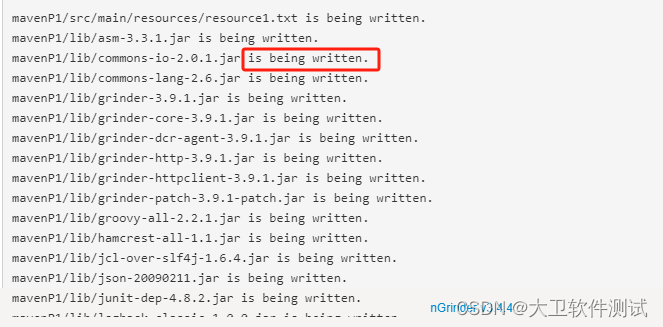
问题6:上传所有的lib库后,验证压测脚本时还是失败,提示所有的lib包is being written.
当你在nGrinder上验证脚本时遇到提示说所有的lib库文件“is being written”,这通常意味着nGrinder在尝试访问这些库文件时,它们可能正处于某种被锁定或正在写入的状态,导致nGrinder无法正确读取。这种情况可能由几种原因引起:
-
文件传输或解压未完全完成:确保所有
lib目录下的文件都已经完全上传并且解压缩完毕。有时候,特别是在大文件或网络不稳定的情况下,文件可能看似上传完毕但实际上还在后台进行写入操作。 -
文件系统或网络延迟:检查是否有文件系统级别的延迟或网络延迟,尤其是在使用网络文件系统(NFS)或其他分布式存储时,可能会出现文件锁的问题。
-
权限问题:确保nGrinder运行的服务账户对
lib目录及其内容有适当的读取权限。有时,文件在上传过程中可能会暂时改变权限或所有权,影响后续访问。 -
文件锁定:检查是否有其他进程或服务正在访问这些库文件,导致它们被锁定。这在多用户或多任务环境下更常见。
解决此问题的建议步骤:
-
等待并重试:首先,可以简单地等待一段时间,确保所有文件传输和处理完全结束,然后再尝试验证脚本。
-
手动检查文件状态:登录到nGrinder服务器,使用命令行工具(如
ls -l或lsof命令)检查lib目录下文件的状态,确认没有进程正在访问或锁定这些文件。 -
重启服务或服务器:如果怀疑是服务或系统级别的问题,尝试重启nGrinder服务或相关服务,甚至整个服务器,以清除可能的锁定状态。
-
检查权限设置:确认nGrinder运行账户对
lib目录及其中文件有正确的读权限。必要时调整权限设置。 -
检查存储配置:如果你使用的是特殊的存储解决方案(如NFS),确保其配置正确,没有导致文件访问延迟或锁定的问题。
通过上述步骤排查并解决问题后,再次尝试验证脚本,应该能够成功执行。
######################################################
注意点
注意1:ngrinder-groovy依赖包
ngrinder的基础依赖,必须下载正常,否则几乎脚本的所有内容都报红。
        <dependency>
			<groupId>org.ngrinder</groupId>
			<artifactId>ngrinder-groovy</artifactId>
			<version>${ngrinder.version}</version>
			<scope>provided</scope>
		</dependency>
读文件&发起http请求,只需要这一个依赖就足够了。
注意2:读文件操作,和设置headers参数设置
@BeforeProcess
	public static void beforeProcess() {

		// 设置header参数
		List<NVPair> headerList = new ArrayList<NVPair>()
		headerList.add(new NVPair("Content-Type", "application/json"));
		headers = headerList.toArray()

		//获取数据,文件:/resources/phone.txt
		String path = this.getClassLoader().getResource("phone.txt").getPath()
		phoneNumList = new File(path).readLines(); #三行内容为 [111, 222, 333]

    }
注意3:json格式处理
如果接口返回的时json格式,压测脚本应导入工具类RecorderUtils
使用RecorderUtils类时,需要maven导入ngrinder-runtime-3.4.4.jar包。
        <dependency>
			<groupId>org.ngrinder</groupId>
			<artifactId>ngrinder-runtime</artifactId>
			<version>3.4.4</version>
		</dependency>
压测脚本:
import org.ngrinder.recorder.RecorderUtils
import org.hamcrest.Matchers

#使用工具类的RecorderUtils.parseRequestToJson 方法解析json数据,使用如下:
def json_object = RecorderUtils.parseRequestToJson(result.getText())
println(json_object);
println(json_object['msg']);

#assert方式如下 assertThat(json_object.get('msg'), Matchers.is("success")) assertThat(1,Matchers.is(1))
assertEquals(1,1)
注意4:生成随机字符串
需要maven导入依赖:
<dependency>
   <groupId>org.apache.commons</groupId>
   <artifactId>commons-lang3</artifactId>
   <version>3.12.0</version> <!-- 可以指定为最新的稳定版本 -->
</dependency>
压测脚本编写导入RandomStringUtils
数字:RandomStringUtils.randomNumeric(length);
字母:RandomStringUtils.randomAlphabetic(length);
字母加数字:RandomStringUtils.randomAlphanumeric(length);
所有ASCCII字符:RandomStringUtils.randomAscii(length);
自定义混合字符:RandomStringUtils.randomAscii(length, string);
压测脚本:
import org.apache.commons.lang.RandomStringUtils
RandomStringUtils.randomNumeric(3)
pom.xml文件 参考
<project xmlns="http://maven.apache.org/POM/4.0.0" xmlns:xsi="http://www.w3.org/2001/XMLSchema-instance"
		 xsi:schemaLocation="http://maven.apache.org/POM/4.0.0 http://maven.apache.org/xsd/maven-4.0.0.xsd">
	<modelVersion>4.0.0</modelVersion>
	<groupId>ngrinder</groupId>
	<artifactId>www.baidu.com</artifactId>
	<version>0.0.1</version>

	<properties>
		<ngrinder.version>3.4</ngrinder.version>
		<maven.compiler.source>1.7</maven.compiler.source>
		<maven.compiler.target>1.7</maven.compiler.target>
		<project.build.sourceEncoding>UTF-8</project.build.sourceEncoding>
	</properties>
	<repositories>
		<!--

    <repository>
        <id>ngrinder.maven.repo</id>
        <url>https://github.com/naver/ngrinder/raw/ngrinder.maven.repo/releases</url>
    </repository>
    -->
	</repositories>
	<dependencies>
		<dependency>
			<groupId>org.ngrinder</groupId>
			<artifactId>ngrinder-groovy</artifactId>
			<version>${ngrinder.version}</version>
			<scope>provided</scope>
		</dependency>
		<dependency>
			<groupId>net.sf.grinder</groupId>
			<artifactId>grinder-core</artifactId>
			<version>3.9.1</version>
		</dependency>
		<dependency>
			<groupId>org.ngrinder</groupId>
			<artifactId>grinder</artifactId>
			<version>3.9.1-patch</version>
		</dependency>
		<dependency>
			<groupId>net.sf.grinder</groupId>
			<artifactId>grinder-http</artifactId>
			<version>3.9.1</version>
		</dependency>
		<dependency>
			<groupId>net.sf.grinder</groupId>
			<artifactId>grinder-httpclient</artifactId>
			<version>3.9.1</version>

		</dependency>
		<dependency>
			<groupId>net.sf.grinder</groupId>
			<artifactId>grinder-dcr-agent</artifactId>
			<version>3.9.1</version>
		</dependency>
		<dependency>
			<groupId>commons-httpclient</groupId>
			<artifactId>commons-httpclient</artifactId>
			<version>3.1</version>
		</dependency>
		<dependency>
			<groupId>com.h2database</groupId>
			<artifactId>h2</artifactId>
			<version>1.3.168</version>
		</dependency>

		<dependency>
			<groupId>commons-fileupload</groupId>
			<artifactId>commons-fileupload</artifactId>
			<version>1.3.1</version>
		</dependency>

		<dependency>
			<groupId>commons-dbcp</groupId>
			<artifactId>commons-dbcp</artifactId>
			<version>1.4</version>
		</dependency>

		<dependency>
			<groupId>cglib</groupId>
			<artifactId>cglib</artifactId>
			<version>2.2.2</version>
		</dependency>

		<!-- Json conversion -->
		<dependency>
			<groupId>com.google.code.gson</groupId>
			<artifactId>gson</artifactId>
			<version>2.2</version>
		</dependency>
		<dependency>
			<groupId>junit</groupId>
			<artifactId>junit-dep</artifactId>
			<version>4.9</version>
			<scope>compile</scope>
		</dependency>
		<dependency>
			<groupId>org.slf4j</groupId>
			<artifactId>slf4j-api</artifactId>
			<version>1.7.22</version>
		</dependency>
		<!-- https://mvnrepository.com/artifact/org.slf4j/slf4j-log4j12 -->
		<dependency>
			<groupId>org.slf4j</groupId>
			<artifactId>slf4j-log4j12</artifactId>
			<version>1.7.22</version>
		</dependency>

		<!-- Commons -->
		<dependency>
			<groupId>commons-io</groupId>
			<artifactId>commons-io</artifactId>
			<version>2.0.1</version>
		</dependency>
		<dependency>
			<groupId>commons-lang</groupId>
			<artifactId>commons-lang</artifactId>
			<version>2.6</version>
		</dependency>
		<dependency>
			<groupId>junit</groupId>
			<artifactId>junit</artifactId>
			<version>4.9</version>
			<scope>compile</scope>
		</dependency>
	</dependencies>

	<build>
		<plugins>
			<plugin>
				<groupId>org.apache.maven.plugins</groupId>
				<artifactId>maven-eclipse-plugin</artifactId>
				<version>2.9</version>
				<configuration>
					<additionalProjectnatures>
						<projectnature>
							org.eclipse.jdt.groovy.core.groovyNature
						</projectnature>
						<projectnature>
							org.eclipse.m2e.core.maven2Nature
						</projectnature>
					</additionalProjectnatures>
				</configuration>
			</plugin>
		</plugins>
	</build>
</project>
参考: