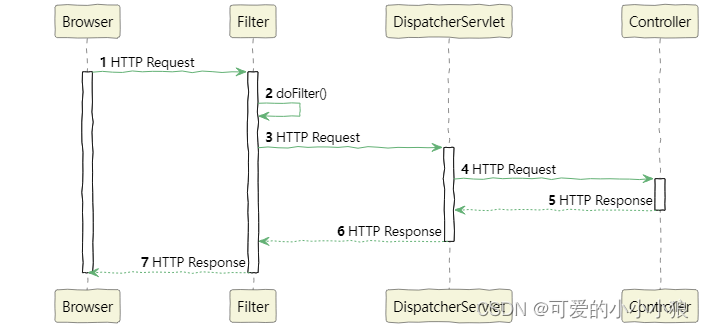
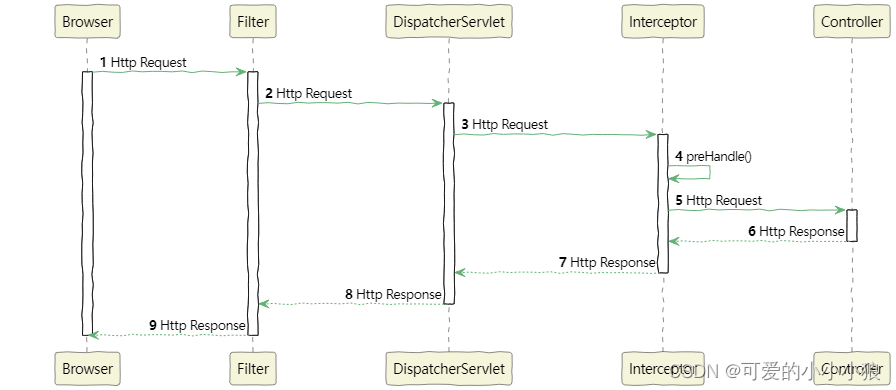
handler在调度controller的方法之前会对HTTP参数和上下文进行解析,将其转换为控制器所需参数,然后传递给控制权。
有四种参数:
- 查询参数(Query Parameters)在url后面的?后的参数
https://example.com/search?q=apple&category=fruits&page=1 - 路径参数(Path Parameters)
https://example.com/users/{userId}/posts/{postId} - 请求头中的参数(通常情况下,请求头中包含的参数是标准化的元数据和授权信息,但也可以在请求头中携带自定义的参数)
Host: example.com
Authorization: Bearer token123
X-Custom-Header: value123 - 请求体中的JSON或者表格参数
在无注解下获取URL中的查询参数(Query Parameters)
请求URL:http://localhost:8080/my/no/annotation?iniVal=10&longVal=200
@GetMapping("/no/annotation")
@ResponseBody
public String noAnnotation(int intVal,long longVal){
return "success"
};
在URL中的参数和Controller方法中的参数名一致
使用@RequestParam获取URL的查询参数(Query Parameters)
请求URL:http://localhost:8080/my/no/annotation?ini_val=10&longVal=200
@GetMapping("/no/annotation")
@ResponseBody
public String noAnnotation(@RequestParam(value="int_val",required=false)int intVal,long longVal){
return "success"
};
无注解下自动获取URL的查询参数(Query Parameters)数组
请求URL:http://localhost:8080/my/no/annotation?iniVal=1,2,3&longVal=4,5,6
@GetMapping("/no/annotation")
@ResponseBody
public String noAnnotation(int【】 intVal,long【】 longVal){
return "success"
};
获取HTTPbody中的json对象
@GetMapping("/insert")
@ResponseBody
public String noAnnotation(@RequestBody User user){
return user;
};
@ResquestBody接收前端的JSON请求体(JSON对象的属性名称和User类的属性名称必须一致),这样就能将JSON请求对象转换为Java对象。
获取HTTP的路径参数
@GetMapping("/{id}")
@ResponseBody
public User get(@PathVariable("id") long id){};
自定义参数转换规则
@Component
public class StringToUserConverter implements Converter<String,User>{
	@Override
	public User convert(String userStr){
		.....
		return user;
	}
}
实现Converter接口,使用@Component标注,注册到ioc中,handler会自动找到这个进行参数转换。
当你注册了自定义的转换器后,它会覆盖Spring MVC 默认的参数转换规则。这意味着当Spring MVC 遇到需要将字符串转换为User对象的情况时,会优先使用你提供的StringToUserConverter来执行转换,而不是使用默认的转换规则。
实现CenericConverter集合和数组的转换